UC Davis Campus Parking
Parking Information
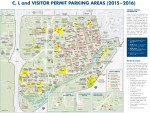
Parking Lots 47 and 40 are the closest to Academic Surge Building, Bainer Hall, and Kemper Hall.
Parking Lots 1 and 2 are the closest to UC Davis Conference Center.
Parking
A valid UC Davis permit is required to park on campus on the weekdays (Parking is free during the weekend).
1. Pay at the Kiosk
Daily Visitor Permits are available for purchase from permit dispensing machines located at the entrances to parking Lot 1 (in the bus shelter). Permit dispensers accept Visa and Mastercard only (they do not accept cash). You can use any parking kiosk to purchase a Zone C parking permit. Parking Lot 47 has a kiosk. However, Lot 40 does not.
2. Pay via Honk App
Using Honk app is recommended. It accepts credit card, Apple Pay, and Google pay.
- On your phone, download the app
- Create account using preferred email address.
- Tap Zone ID button in top left corner.
- Enter Zone ID: UCDC
- Select Visitor
- Respond to questions and pay
Also, here is Step-by-step instruction: https://transportation.ucdavis.edu/aggiepark/honkmobile
3. Pay via website
- Go to https://aimsmobilepay.com/
- Type in "UC Davis"
- Choose "C Zone/Visitor Parking"
- Then select "Add Vehicle" and respond to questions.
- Add your credit card info.
- And check out.
Electrical Vehicle Charging
Users need to download the free PowerFlex mobile app (iPhone or Android) to manage sessions, scan QR codes at chargers, and monitor availability: https://transportation.ucdavis.edu/parking/electric-vehicles
If you need assistance, please call UCD Transportation Services: (530) 754-3687.
Map
This is an interactive map for UC Davis and city of Davis. The PDF file for the map is also available